

LIVE AI MASTERCLASSES
FOR INTERIOR DESIGN PROFESSIONALS
Online or on-site · December through February
AI visualization and automation
Midjourney · Magnific · Claude
WOULD YOU LIKE TO LEARN HOW TO USE AI TO:
- How to create your own photorealistic images for mood boards and social media;
-How to render your sketches and scenes beautifully and quickly;
-How to convert your floor plans into 3D models for SketchUp
-How to turn an interior item in an image into a 3D model for SketchUp
-How to visualize new interiors within an existing space
-How to edit your visuals quickly and beautifully
- How to create and edit short videos of your best visualizations for presentations and social media?
-How can Claude help you automate both your visualizations and your workflows?
Then come to one of my LIVE AI Masterclasses!
Online or in person, from December through February.
Check out all the dates below, and I look forward to seeing you soon!
Marielle van Essen
Interior Designer & AI Trainer
ON-SITE MASTERCLASSES
DEC - JAN - FEB
TUESDAY, DECEMBER 15 — UTRECHT
Location: Quinton House Utrecht
Time: 1:00 p.m. – 5:00 p.m.
Max. 12 people
Cost: €297, excluding VAT (€359.37 including VAT)
Bonuses:
- PDF prompt guidelines and terms
- PDF prompts for renders
- PDF prompts for videos
- Excel Prompt Log
- 2 weeks of online support after the masterclass
- discount on On Demand courses
THURSDAY, JANUARY 14 — AMSTERDAM
Location: Fosbury and Sons
Time: 1:00 p.m. – 5:00 p.m.
Max. 12 people
Cost: €297, excluding VAT (€359.37 including VAT)
Bonuses:
- PDF prompt guidelines and terms
- PDF prompts for renders
- PDF prompts for videos
- Excel Prompt Log
- 2 weeks of online support after the masterclass
- discount on On Demand courses

THURSDAY, FEBRUARY 11 — UTRECHT
Location: Quinton House Utrecht
Time: 1:00 p.m. – 5:00 p.m.
Max. 12 people
Cost: €297, excluding VAT (€359.37 including VAT)
Bonuses:
- PDF prompt guidelines and terms
- PDF prompts for renders
- PDF prompts for videos
- Excel Prompt Log
- 2 weeks of online support after the masterclass
- discount on On Demand courses
ONLINE MASTERCLASSES
DEC - JAN - FEB
Tue, Dec. 1 & Thu, Dec. 3, 7:30–9:30 p.m.
Live online via Zoom
197 ex. VAT (238.37 incl. VAT)
Two 2-hour sessions
Bonuses:
- PDF of prompt rules and terms
- PDF of prompts for renders
- PDF of prompts for videos
- Excel Prompt Log
- 1 week of online support after the masterclass
- Discount on on-demand courses

Tue, Jan. 26 & Thu, Jan. 28, 9:30–11:30 a.m.
Live online via Zoom
197 ex. VAT (238.37 incl. VAT)
Two 2-hour sessions
Bonuses:
- PDF of prompt rules and terms
- PDF of prompts for renders
- PDF of prompts for videos
- Excel Prompt Log
- 1 week of online support after the masterclass
- Discount on on-demand courses

Tue, Feb. 16 & Thu, Feb. 18, 9:30–11:30 a.m.
Live online via Zoom
197 ex. VAT (238.37 incl. VAT)
Two 2-hour sessions
Bonuses:
- PDF of prompt rules and terms
- PDF of prompts for renders
- PDF of prompts for videos
- Excel Prompt Log
- 1 week of online support after the masterclass
- Discount on on-demand courses
CRAFTMANSHIP COMES FIRST,
AI SUPPORTS
“As a designer and AI trainer, craftsmanship and creativity are always my top priorities. AI will never replace that; AI assists.”
Marielle van Essen

STUDENT REVIEWS
-
![]()
“Had a great training session with the team!”
“We had an AI training session with Mariëlle at our studio, and we were incredibly enthusiastic about it. The training was clear, engaging, and easy to follow, but above all, it was very practical and immediately applicable. Mariëlle explained everything in a clear and fun way and gave us plenty of inspiration to get started on our own. It was truly a valuable and inspiring training session!”
Mignon van de Bunt Interior Design
-
![]()
“Use AI Effectively”
“I see plenty of opportunities to apply this in my professional work and create powerful visual content. Marielle walks you through all the features and techniques in a clear, accessible, and enthusiastic way. I highly recommend this course to anyone who wants to quickly learn how to use AI effectively.”
Marjolein Deurlo, *The Novel Grey*
-
![]()
“Highly recommended”
“I loved the Midjourney Mastery Course. Marielle explains everything very clearly and in a fun way, and I really enjoyed the LIVE sessions! We were able to discuss our AI images and connect with other designers. I highly recommend it!”
Margot Smit, Designed by Margot
-
![]()
“Incredibly inspiring”
“ Marielle van Essen ’s Midjourney course has opened up a whole new world for me. It’s incredibly inspiring to learn how to design concepts in a completely new way. Marielle explains everything clearly, with a delightful sense of humor. I highly recommend it!”
-
![]()
“Endless possibilities”
“I just couldn’t stop taking the course. I’m really impressed by the amazing images I can create now. With these AI tools, I see endless possibilities for my career!”
-
![]()
“Highly recommended for designers”
“Highly recommended for designers. I took a really fun and informative Midjourney course, with clear explanations from Marielle. Midjourney is the go-to future-oriented tool for designers; it’s truly impressive what you can create with it.”
-
![]()
“Great results”
“I highly recommend the AI courses at Marielle van Essen . As an interior designer, a whole new world has really opened up for me.”

WHAT EXACTLY DO YOU LEARN IN THE AI MASTERCLASSES?
-
ATTRACT PREMIUM PROJECTS WITH PHOTOREALISTIC IMAGES
In this section, I’ll teach you how to use Midjourney to create beautiful, photorealistic images super fast—for mood boards, social media, and your website. And most importantly: how to write really good prompts.

-
MAKE AN IMMEDIATE IMPACT ON CUSTOMERS DURING THE CONCEPT PHASE
Forget Pinterest images. With Midjourney and Nano Banana Pro in Magnific, you can quickly create stunning mood boards using your own images—images that showcase your design vision as applied to your clients’ actual spaces. Even if you only have floor plans to work with.


-
CREATE BEAUTIFUL RENDERS IN MINUTES
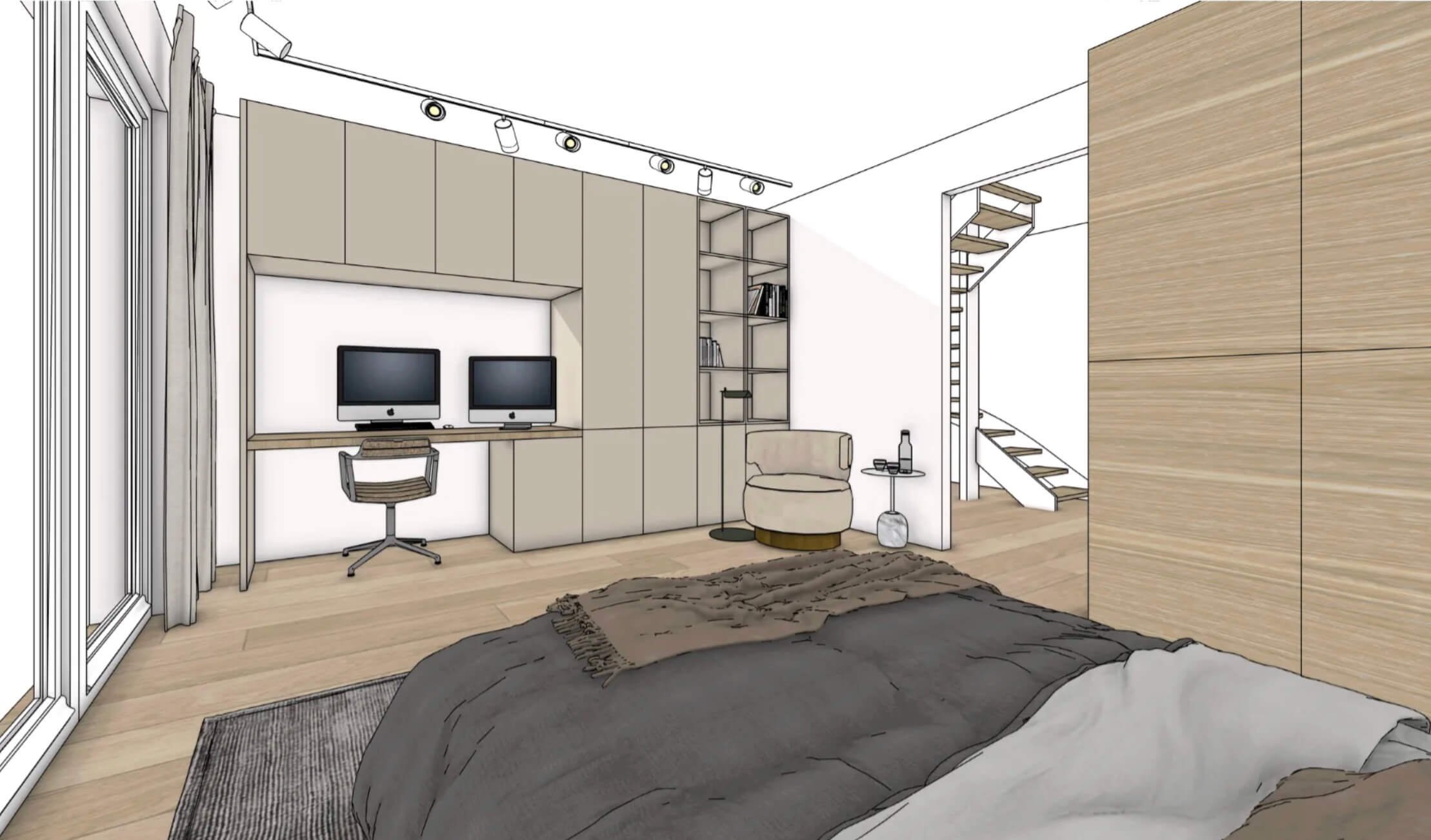
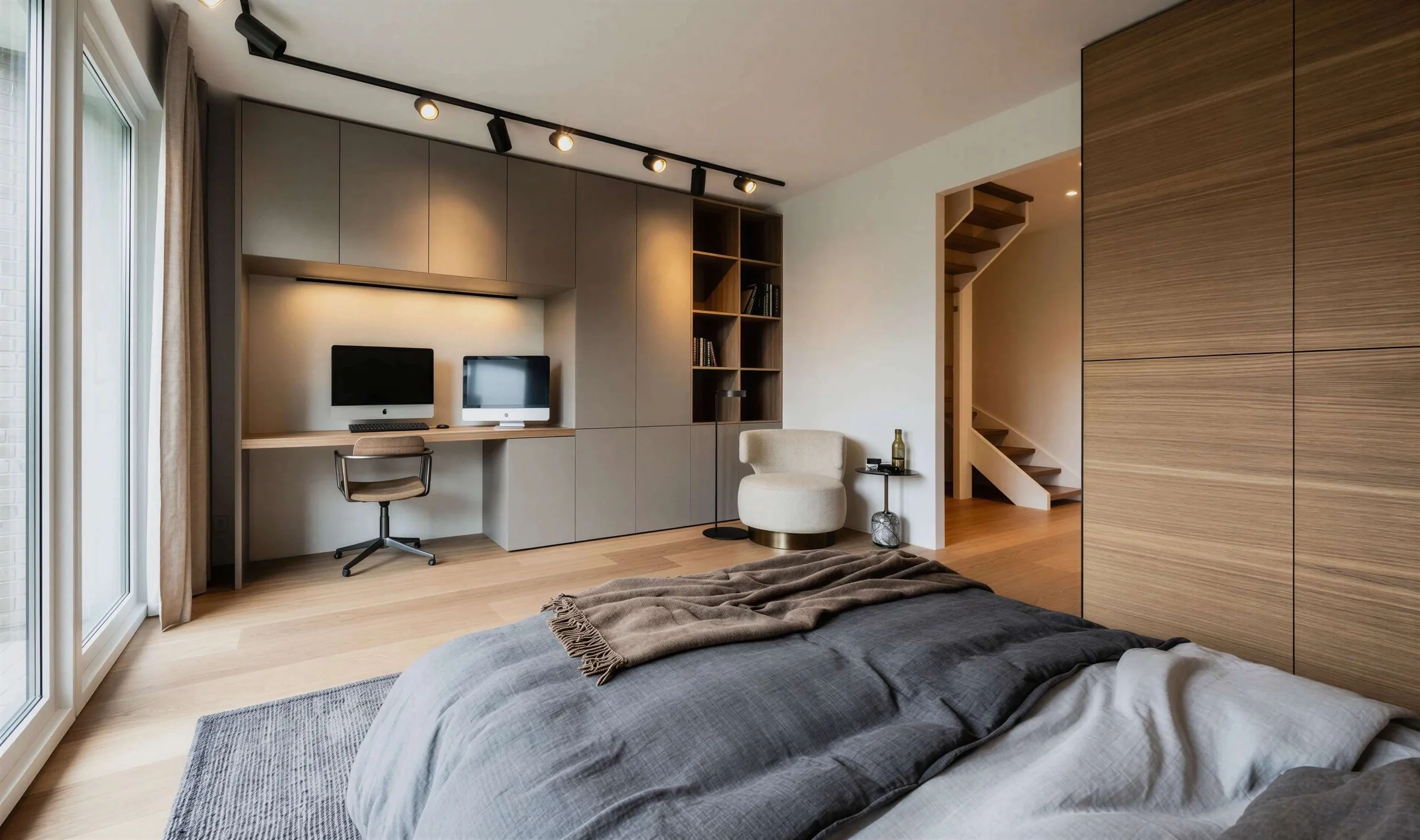
You've created a scene in your 3D model. In the past, you had to hire someone to do the rendering, or wait hours yourself until your image was ready. This rendering on the right took me 2 minutes.
In this section, I'll show you how to do that yourself in Magnific—even starting from a hand-drawn sketch, without using SketchUp.
-
DESIGN & EDIT IN JUST A FEW MINUTES
You'll learn how to quickly customize renders and photos with different furniture, lighting, and materials. You'll also learn how to use Magnific to turn an image into a 3D model for your SketchUp file. Plus, a quick look at the latest developments in SketchUp AI.
And much more!


-
MAKE YOUR FINAL PRESENTATION AN EXPERIENCE
Moving images make a bigger impression than still images. I'll show you how to animate your renders and designs so your clients can truly experience the spaces.
-
LET CLAUDE / CHATGPT DO YOUR BORING WORK
I'm also going to briefly show you how you can get ChatGPT or Claude to do some of your boring work for you. That way, you'll have more time for the fun part: designing!


LEARN HOW TO WORK WITH AI
FROM AN INTERIOR DESIGNER
Hi, I'm Marielle van Essen.
After 20 successful years as a criminal defense attorney in Amsterdam, I decided to pursue my other passion: interior design.
I soon realized how much time the job took. Creating mood boards, building SketchUp models, incorporating revisions—and consistently working more hours than I was paid for.
That changed when I started using AI three years ago. By making smart use of the right tools, I was able to save about 8 hours a week, leaving me more time for the creative part of my work. That freedom also gave me the flexibility to work internationally, including in Spain.
My enthusiasm for AI grew so much that I started training other interior design studios. That’s how the MVE Academy came to be.
Through the MVE Academy, I provide customized AI training sessions at interior design studios, offer online courses, and host live masterclasses at beautiful venues.
Would you like to attend a LIVE Masterclass? Choose your date—online or in person.
FREQUENTLY ASKED QUESTIONS
IS EXPERIENCE REQUIRED?
No, whether or not you’ve worked with AI before: I’ll teach you how to write really effective prompts (how to communicate with AI). I’ll teach you how to achieve exactly the style you want. I’ll teach you how to create interior images that are indistinguishable from the real thing.
1
WHAT DO I NEED?
A laptop, a separate mouse, and a good web browser, such as Google Chrome. You don’t necessarily need a subscription for Midjourney. You can check it out first. For rendering, editing, 3D modeling, and animation, sign up for a monthly subscription to Magnific Premium. You only need to sign up for one month. You can also use Claude with a free account.
2
WHERE DO I NEED TO BE?
In-person sessions: December 15 and February 11 in Utrecht, January 14 in Amsterdam. The address is provided when you register. You can participate online from your own laptop.
3
I'M NOT TECH-SAVVY!
Believe me, neither am I. But the AI platforms' websites are very easy to use. And I'll teach you exactly how. You won't need to install any software on your computer—let alone complicated software. You'll always be working in the cloud. The most important thing with AI is learning how to prompt it effectively (talking to AI).
4
